
Quiz night in your pocket · free for hosts and players
Host a brilliant quiz night at home — or over a video call.
Write the questions, put them on the TV or share them on Zoom, and everyone answers on their own phone. Marking, timers and the leaderboard happen live — and it’s completely free.
Players join by QR code No app or account for players Play on the TV or over Zoom
Made for Family game nights · Friends on video calls · Birthday parties · Kids’ quizzes · Holiday get-togethers · Long-distance catch-ups
For quiz hosts
Everything you need to run a brilliant quiz.
No paper, no pens, no arguments about handwriting. Just a laptop, a screen and everyone’s phones — on the sofa or on a video call.
A quiz writer that checks your work
Ten question types, points, timers and host notes — with live warnings for missing answers, duplicates and unbalanced difficulty.
Phones become buzzers
Players scan the QR code or type a 5-letter game code. Answers lock when the timer ends, so nobody can look things up.
Live big-screen mode
One click turns any quiz into a full-screen show with countdowns, reveals and a running leaderboard.
Speed bonuses & jokers
Speed bonuses, joker rounds, buzzer rounds and a Last team standing round with a points ladder and a 50:50 lifeline.
Play on the TV or over Zoom
Put the big screen on your TV, or open the second screen and share it on Zoom, Teams or Meet — your controls and answers stay private.
Print or export anything
Answer sheets, player sheets, CSV and JSON. Import questions straight from a spreadsheet.
How it works
From blank page to game night in three steps.
1
Write or import a quiz
Build rounds in the online editor, or import questions from a spreadsheet. It checks your answers as you type.
2
Press Host live
Put the host screen on the TV, or share it on Zoom. Everyone scans the QR code or types the 5-letter game code.
3
Let the scores roll in
Answers are marked the moment they arrive. Reveal the leaderboard whenever you want the drama.
The quiz writer
Write better questions, faster
A writing tool built by quizmasters, for quizmasters — so the only thing you argue about on the night is the answers.
- Ten formats — multiple choice, true/false, written, number, closest wins, picture reveals, audio, put-in-order, Pin it on a map, and buzzer questions.
- Quiz health checks flag missing answers, duplicate questions and lopsided difficulty as you type.
- Host notes & fact-check links that players never see.
- Write online, host live. Autosaving browser editor, spreadsheet import, and one click to start a live game.
✓ 10/10 ready
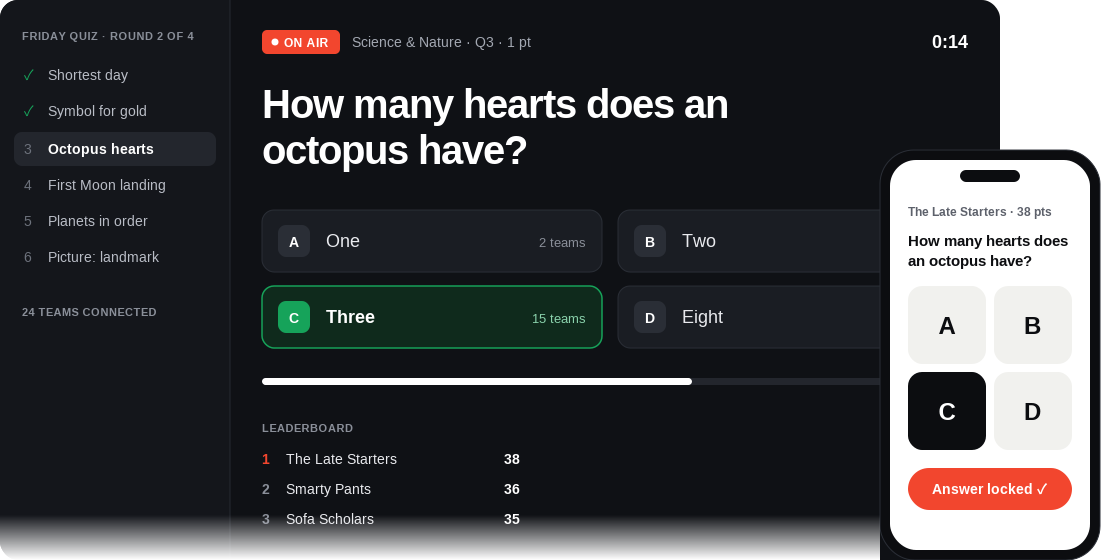
How many hearts does an octopus have?
A · One
B · Two
C · Three
D · Eight
Your night, your format.
Mix and match rounds to suit everyone — from a quick family warm-up to a full birthday quiz.
Classic general knowledge
Buzzer round
Picture reveals
Name that tune
Music bingo
Closest wins
Pin it on a map
Last team standing
Joker round ×2
Zoom quiz
Kids’ quiz
Family vs family
New · Music bingo
Eyes down for the music.
Paste a list of songs and Tap Trivia deals every player a different bingo card on their phone. You play the tunes — from Spotify, any music app or uploaded clips — and everyone taps the songs they hear.
- Upload a folder of MP3s — song titles and artists are read from the files automatically.
- Add a Spotify, YouTube or Apple Music link to each song — one tap on your host screen opens it.
- Every claim is checked, so only songs that have actually played count.
- Points for the first line and the full house go straight onto the leaderboard.
Between rounds
Mini games for bonus points.
Thirty seconds of chaos while everyone grabs snacks. Launch one from the leaderboard and the winners get bonus points.
Tap Frenzy
Ten seconds. Tap your phone as fast as you can. The fastest fingers win.
Stop the Clock
The timer vanishes after three seconds. Stop it as close to 10.00 as you can.
Reaction Test
Wait for it… tap the moment the screen turns green. Jump the gun and you’re out.
Lucky Boxes
Twelve mystery boxes. Pick one — it could be five bonus points, or a sneaky minus two.
Count the Dots
Dots flash up on the big screen for three seconds. How many were there? Closest guesses win.
Colour Clash
RED written in blue ink. Tap the colour of the ink, not the word — as many as you can in 20 seconds.
Game changers
Twists that flip the leaderboard.
Add twists to any question or whole round as you write, or switch them on live from the big screen. Nobody’s lead is safe.
×2
Double points
Every point on the question counts twice — a perfect late twist.
−
Wrong answer loses points
Confident? Get it wrong and the points come off your score.
⇧
Quickest goes top
The fastest right answer jumps straight to 1st place, one point clear.
❄
Freeze-out
A wrong answer freezes your team out of the next question.
⚔
Quick-draw duel
The two quickest answers duel. Right goes top, wrong goes bottom.
💥
Points wipe-out
The big one. A wrong answer wipes your score back to zero.
Pick your buzzer. Be quickest.
Every team chooses a buzzer sound when they join — air horn, quack, laser and more. The top three quickest right answers win +3, +2 and +1 bonus points, and the quickest team’s buzzer plays on the big screen. Hosts can also upload their own sounds, up to 12 seconds, and give them to any team.
🔴 Classic📯 Air horn🔔 Bell⚡ Laser🦆 Quack🌀 Boing🚨 Siren👾 Arcade🥁 Drum roll📢 Whistle
Playing tonight?
Got a game code? Jump in.
Type the 5-letter code from the host’s screen, pick a team name, and you’re playing. No app, no account, no cost.
Hosting instead? Write a quiz and press Host live — it’s free.
Questions hosts ask.
Is it really free?
Yes. Writing quizzes, hosting them live and playing are all free — there are no paid plans or player limits.
Can we play over Zoom, Teams or Google Meet?
Yes. On the host screen, press “Second screen” and share that window on your video call (tick “share sound” to hear the buzzers). Your own window keeps the controls and answers private, and everyone plays on their phone.
Do players need to download anything?
No. Players go to the Join page in their phone’s browser (or scan the QR code on screen) and type the game code. Teams can share one phone.
What equipment do I need to host?
A laptop or tablet, plus a TV — or a video call to share the screen on. Players just need their phones.
Can I write my own questions?
Yes — use the built-in quiz writer, import a spreadsheet, or mix your own questions with ready-made rounds.
Can players cheat by looking things up?
Every question can have a timer. Answers lock the moment it runs out, and speed bonuses reward people who answer straight away.
Can I print answer sheets?
Any quiz can be printed as a player sheet or an answer sheet, or exported to CSV and JSON.
Free for hosts. Free for players.
No subscriptions, no card, no app to install. Write a quiz, press Host live, and players join with a code.